Wireless Domain Object
Wireless domain objects define an area within which the results of certain pipeline stage calculations can be cached and reused for transmitters and receivers in that area. The calculations typically cached are channel match, closure, propagation delay, and path loss.
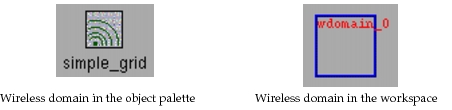
Wireless domain objects are instances of wireless domain models. The default representation of a wireless domain differs in the object palette and workspace, as shown in the following figure.
Figure 61: Default Wireless Domain Icons
For more information about wireless domains, refer to “Wireless Domains” on page 11.
Wireless Domain Object Attributes
The built-in attributes of the wireless domain object are listed below, in alphabetical order.
Table 21: Wireless Domain Object Built-In Attributes
| Name | Editing Data Type |
|---|---|
| chanmatch model | typed file |
| closure model | typed file |
| creation data | string |
| creation source | string |
| creation timestamp | date |
| doc file | string |
| icon name | icon |
| model | typed file |
| name | string |
| outline color | color |
| propdel model | typed file |
| tooltip | string |
| x position | double |
| x span | double |
| y position | double |
| y span | double |
chanmatch model
This attribute specifies the name of a compiled pipeline procedure to be used for the channel match pipeline stage of channels assigned to this wireless domain object. If NONE, the normal model is used (that is, the model specified by the “chanmatch model” attribute of the corresponding transmitter).
Refer to Chapter 10 “Radio Transceiver Pipeline” on page 263 for more information about this pipeline stage.
| Editing | Simulation | |
|---|---|---|
| Data Type | typed file | string |
| Access | read / write | read |
| Default Value | “NONE” | |
| Units | ||
| Constraints |
closure model
This attribute specifies the name of a compiled pipeline procedure to be used for the closure pipeline stage of channels assigned to this wireless domain object. If NONE, the normal model is used (that is, the model specified by the “closure model” attribute of the corresponding transmitter).
Refer to Chapter 10 “Radio Transceiver Pipeline” on page 263 for more information about this pipeline stage.
| Editing | Simulation | |
|---|---|---|
| Data Type | typed file | string |
| Access | read / write | read |
| Default Value | “NONE” | |
| Units | ||
| Constraints |
creation data
This attribute specifies additional information about the creation of the object.
| Editing | Simulation | |
|---|---|---|
| Data Type | string | not applicable |
| Access | read/write | not applicable |
| Default Value | “” | |
| Units | ||
| Constraints |
creation source
This attribute specifies how the object was created.
| Editing | Simulation | |
|---|---|---|
| Data Type | string | not applicable |
| Access | read/write | not applicable |
| Default Value | “Object Palette” | |
| Units | ||
| Constraints |
creation timestamp
This attribute specifies when the object was created.
| Editing | Simulation | |
|---|---|---|
| Data Type | date | not applicable |
| Access | read/write | not applicable |
| Default Value | ||
| Units | ||
| Constraints |
doc file
This attribute specifies the name of the documentation file (help card) that is displayed when a user invokes help for this object via the Help > What’s This menu item. The value of this attribute has no impact on simulation behavior.
| Editing | Simulation | |
|---|---|---|
| Data Type | string | N/A |
| Access | read / write | N/A |
| Default Value | wdomain | |
| Units | ||
| Constraints |
icon name
This attribute specifies the bitmap used to represent the wireless domain in the object palette. (In the Project Editor workspace, wireless domains are represented by an outline representing their extent.) The value of this attribute has no impact on simulation behavior.
| Editing | Simulation | |
|---|---|---|
| Data Type | icon | N/A |
| Access | read / write | N/A |
| Default Value | wdomain | |
| Units | ||
| Constraints |
model
This attribute specifies the name of a wireless domain model developed with the Wireless Domain Editor. The wireless domain model represents the organization and behavior of the wireless domain.
| Editing | Simulation | |
|---|---|---|
| Data Type | typed file | string |
| Access | read / write | read |
| Default Value | ||
| Units | ||
| Constraints |
name
This attribute specifies a string used for identification purposes. It is useful for identifying a wireless domain in the workspace. It is also used during simulation to obtain the node’s object ID, via the KP op_id_from_name(). The object ID, in turn, is useful for obtaining attribute values. The Simulation Kernel makes no use of this attribute.
| Editing | Simulation | |
|---|---|---|
| Data Type | string | string |
| Access | read / write | read |
| Default Value | wdomain_n, n >= 0 |
|
| Units | ||
| Constraints | unique name, no dots, not “top” |
outline color
This attribute specifies the color of the wireless domain when drawn in the Project Editor. This attribute has no effect on simulation. The outline color attribute can have values ranging from RGB000 to RGB333, where each digit is an integer between 0 and 3 inclusive. The higher the first digit, the more red; the higher the second digit, the more green; and the higher the third digit, the more blue. Thus RGB000 corresponds to black, RGB333 corresponds to white, RGB300 corresponds to red, and so on.
| Editing | Simulation | |
|---|---|---|
| Data Type | color | N/A |
| Access | read / write | N/A |
| Default Value | RGB003 | |
| Units | ||
| Constraints | See description |
propdel model
This attribute specifies the name of a compiled pipeline procedure to be used for the propagation delay pipeline stage of channels assigned to this wireless domain object. If NONE, the normal model is used (that is, the model specified by the “propdel model” attribute of the corresponding transmitter).
Refer to Chapter 10 “Radio Transceiver Pipeline” on page 263 for more information about this pipeline stage.
| Editing | Simulation | |
|---|---|---|
| Data Type | typed file | string |
| Access | read / write | read |
| Default Value | “NONE” | |
| Units | ||
| Constraints |
tooltip
This attribute specifies the tooltip text that is displayed when a user holds the cursor over the wireless domain object. The value of this attribute has no impact on simulation behavior.
| Editing | Simulation | |
|---|---|---|
| Data Type | string | N/A |
| Access | read / write | N/A |
| Default Value | “Wireless Domain” | |
| Units | ||
| Constraints |
x position
This attribute specifies the x-coordinate of the center of the wireless domain extent. Its value is specified in degrees and corresponds to the longitude of the center point. A positive value refers to degrees East longitude and a negative value refers to degrees West longitude.
| Editing | Simulation | |
|---|---|---|
| Data Type | double | double |
| Access | read / write | read |
| Default Value | N/A | |
| Units | degrees | |
| Constraints |
x span
This attribute specifies the width of the wireless domain. The value represents a total extent about the horizontal center (as given by the x position attribute). Its value is specified in degrees. For example, if a wireless domain has an x span of 2 degrees and a y span of 3 degrees centered on point (a,b), objects within that wireless domain can have positions between (a-1, b-1.5) and (a+1, b+1.5).
| Editing | Simulation | |
|---|---|---|
| Data Type | double | double |
| Access | read / write | read |
| Default Value | N/A | |
| Units | degrees | |
| Constraints | >= 0.0 |
y position
This attribute specifies the y-coordinate of the center of the wireless domain extent. Its value is specified in degrees and corresponds to the latitude of the center point. A positive value refers to degrees North latitude and a negative value refers to degrees South latitude.
| Editing | Simulation | |
|---|---|---|
| Data Type | double | double |
| Access | read / write | read |
| Default Value | N/A | |
| Units | degrees | |
| Constraints |
y span
This attribute specifies the length of the wireless domain. The value represents a total extent about the vertical center (as given by the y position attribute). Its value is specified in degrees. For example, if a wireless domain has an x span of 2 degrees and a y span of 3 degrees centered on point (a,b), objects within that wireless domain can have positions between (a-1, b-1.5) and (a+1, b+1.5)
| Editing | Simulation | |
|---|---|---|
| Data Type | double | double |
| Access | read / write | read |
| Default Value | N/A | |
| Units | degrees | |
| Constraints | >= 0.0 |