Configuring Indexing
Logger files contain index data (checkpoints) that allow quick jumps from one time point to another.
When you jump the Logger to a time point, it jumps to the nearest checkpoint before the selected time point and then processes the packets in the file to the specified time point. (The packets are not sent over the network.) Therefore, the efficiency of time jumps is determined by the frequency of checkpoints. Having more frequent checkpoints speeds up time jumps. However, more checkpoints increases file size and can slow down recording, particularly if the exercise has many entities. So when you specify your checkpoint policy, you must balance your priorities.
When you record, indexing is always enabled. You can set the checkpoint policy (the criteria for how often the Logger adds index data) to one of the following:
- By Frequency, in packets received (default)
- By Size, in bytes
- By Time
Note: If you are currently recording an exercise, changing the preferences does not affect the recording process. It takes effect for the next new file.
Procedure 144: Configuring Indexing in the GUI
-
Choose Options > Preferences. The Preferences dialog box opens.
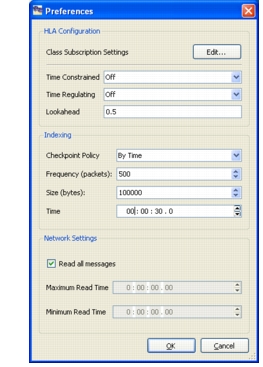
Figure 128: Preferences dialog box (HLA)
-
In the Indexing group box, select the checkpoint policy.
-
Edit the appropriate value for the checkpoint policy you chose (frequency, size, or time).
-
Click OK.
Configuring Indexing Using the Command Interfaces
To configure indexing using a command interface, issue the SetCheckpointParameters command (Table 38).
Table 38: Checkpointing command
| Interface | Command |
|---|---|
| Command line | set OP_3DNV_LOGGER_EXTRA_ARGS = -r "SetCheckpointParameters 0 0 500 0"op_3dlog_launcher_<hla_version>.exeFor details about the parameter values, please see "Recorder Domain Commands" on page 473. |
| Text interface | SetCheckpointParameters 0 0 500 0 |
lgrConfig.xml |
Add SetCheckpointParameters to the configuration file. |