What the Logger Does During Recording and Playback
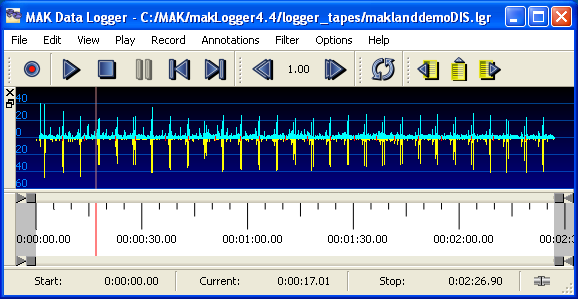
This section describes, in general, what happens when you record and play back exercises. Figure 121 illustrates the Logger window with a file loaded.
Figure 121: The Logger window
The Exercise Connection
Before you can record an exercise or play one back, you must connect to an HLA exercise. You can set connection parameters in lgrConfig.xml, from the command line, or through the GUI. For details, please see "Configuring the Exercise Connection" on page 366.
What The Logger Does During Recording
In record mode, the Logger is in either a recording state or paused state. When paused, the Logger does not record data and does not advance time.
The Logger subscribes to objects, attributes, and interactions, and it records updates, interactions, and object removals that it perceives through the RTI. It requests updates as it discovers each new object, and records values for all published attributes of those objects.
If a recorded object has a name beginning with HLA_, the Logger adds LGR_ to the beginning of the name. This allows these objects to be properly published during playback. You can configure this behavior with the SetDynamicNamePrefix command.
What The Logger Does During Playback
When the Logger is in playback mode, it is in a playing state, a paused state, or a stopped state. When the Logger is playing, it reads messages from a file and transmits them in sequence over the network. When the Logger is paused, it halts at the current timepoint in the file and stops sending new data.
During playback, you can control the playback speed to produce real-time, fast motion, and slow-motion effects. For more information, please see Timescale During Playback.
The Logger lets you navigate to any timepoint in a file. For procedures, please see "Moving the Timepoint to a Specific Time" on page 421.
In HLA, the Logger acts as a federate that owns each of the objects represented in the file. The Logger sends interactions and updates only for classes that other federates are subscribed to. The Logger serves as a proxy simulator, answering requests for attribute updates and making objectRemove RTI calls when it encounters removals in the recorded file.
Note: By default, HLA 1516 uses name reservation. When name reservation is in effect, the RTI does not allow the Logger to create entities with names that have previously been used. This becomes an issue when you loop a Logger file. The RTI can rename objects the second time they are created, but this renaming does not get passed along to the attributes of objects such as aggregates or to interaction parameters. They will look for objects that have the original names and will not be able to find them. If you are using the MÄK RTI, you can work around this problem by disabling the RTI_enableNameReservation, RTI_strictNameReservation, and throwExceptionForDisabledService parameters in rid.mtl.
Recording and Playback Using HLA Time Management
The Logger supports HLA Time Management in both record and playback mode. In record mode, the Logger participates as a time-constrained federate. In playback mode, it participates as a time-regulating federate. The contents of the files created in time-managed mode are identical to those created when not using Time Management, however the arrival time recorded for each packet is determined differently when using Time Management.
Note: HLA Time Management is not supported in the text interface.
Playback Using Time Management
You can play any Logger file with or without Time Management enabled. If you play a file without using Time Management, packets are sent as RO updates. If you are using Time Management, they are sent as TSO updates.
To play files with Time Management enabled, you must use a FED file that is coded to indicate which FOM attributes and parameters are to be sent in TSO mode. The Logger comes with a properly written FED file named VR-LinkTM.fed for use with Time Management.
When the Logger joins a federation in time-managed mode, it asks to be a time-regulating federate. Its initial time request is the current value of the lower bound time stamp (LBTS). If there are no other time regulating federates (LBTS is infinity), the initial time request is zero.
The Logger starts playback at the point in the file where the arrival time equals or exceeds the current federation time grant plus the lookahead. Therefore, it is possible that the Logger could skip significant portions of the file, or even all of it. To ensure that you play the entire file, make sure that the Logger is the first time regulating federate to join the federation execution, or offset the times in the file relative to an appropriate starting time value.
Once it starts playback, the Logger advances at whatever rate is determined by the time scale setting. For more details, see Timescale During Playback.
Some Logger Features are Restricted When You Use Time Management
When you play a file with Time Management enabled, the following restrictions apply:
- You cannot jump to different points in the file
- You cannot pause playback
- You can stop, but you cannot restart unless you restart the entire federation execution.