Configuring Model Instancing
When model instancing is enabled, models that use the same resources can share them. Usually, models can share geometry and textures. Use of model instance caching decreases memory use and improves performance.
Procedure 116: Enabling or Disabling Model Instancing
-
Choose Settings > Display. The Display Settings dialog box opens.
-
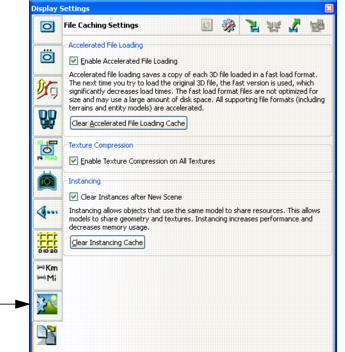
Select the File Caching Settings page (Figure 105).
Figure 105: File Caching Settings page
-
In the Instancing group box, select or clear the Enable Instancing checkbox.
Clearing the Model Instancing Cache
You can clear the model instancing cache if you need the disk space.
Procedure 117: Clearing the Model Instancing Cache
- Choose Settings > Display. The Display Settings dialog box opens.
- Select the File Caching Settings page (Figure 105).
- In the Instancing group box, click the Clear Instancing Cache button.