Animation Macros
The animation macro feature provides a way to build a simple but convenient “tool”: a group of parameterized animation requests that can be executed by a single KP invocation to accomplish a common animation task. Animation macros do not provide complex control structures and do not qualify as a fully general programming language. Instead, they are small groups of animation requests that have been combined and given a unique identifier for invocation. However, macros do offer several properties that increase their scope and descriptive power, as presented below:
- Parameterization: macros support the definition of parameters that can be used as the values for almost all arguments of requests in the macro. This facilitates the definition of general-purpose macros that can be applied to different tasks through parameter specification.
- Re-invocation: macros support multiple re-invocations with parameter changes, while retaining parameters and other state memory that can be reused. This reduces the number of animation requests and argument values that need to be specified to accomplish a recurring animation task, such as moving a graphical object according to a dynamic stream of data.
- Specialization: macros are divided into several sections that can be independently executed under different conditions. This facilitates the comprehensive bundling of related animation requests, especially when some of the requests must only be issued once to initialize state memory, but other requests that use the state memory must be repeatedly issued.
Macros consist of a series of animation requests issued by op_anim_mgp and op_anim_mme KPs (Mgp stands for Macro-Oriented Graphics Primitive and Mme stands for Macro-Oriented Model Element). These KPs reference a macro ID that was assigned when a macro was created, and rather than actually performing a graphical operation, they just append a specification for a graphical operation to the end of the referenced macro. The construction methodology for macros is detailed on the next page.
- A macro is created by invoking the KP
op_anim_macro_create();this causes memory for the macro definition structure to be allocated, and returns a macro ID to the invoking process or procedure. When created, macros are empty of animation requests, but are open (i.e., they can accept animation requests). - Macros are defined one animation request at a time by invoking
op_anim_mgp()orop_anim_mme()KPs and referencing the macro ID obtained in step (1) above. Each such KP invocation appends an animation request to the end of the macro (when invoked, macros execute their requests in First-Come, First-Served (FCFS) order, starting at the beginning and moving towards the end of the macro). Once an animation request has been added to a macro, it cannot be removed or edited. Thus macros grow monotonically. - When a macro has been fully defined, no further animation requests need to be appended to its end, and the macro can be closed to prevent this. The KP
op_anim_macro_close()closes a macro.
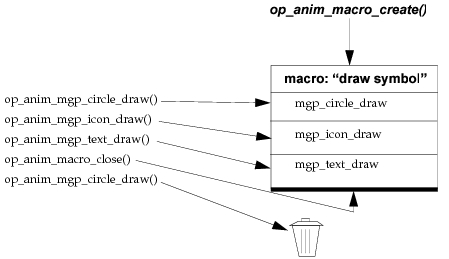
The definition of a typical macro is shown below. Note the rejection of the request issued by the Mgp invocation, due to the macro’s closed state. This feature of closed macros is useful in simulations involving multiple instances of the same process, and will be revisited later in this section.
Figure 29: Definition of Example Macro
Macros support state memory through a mechanism based on registers. Each macro can access up to 26 registers, named A-Z, and all the registers are identical in capability and access methods. Every time a macro is invoked, or drawn, a new bank of 26 registers is allocated for use by the macro instance (known as a macro drawing). Macro drawing registers are retained in memory for as long as their associated macro drawing is retained. Thus a macro drawing’s bank of registers is dedicated to the use of that drawing, and can serve as its state memory.
Registers can hold all three basic macro data types: integers, doubles, and strings. When a register is assigned a value, the register is identified by name and data type, and it stores its value using the indicated data type until it is assigned another value. Registers may be assigned values by the requests issued by two op_anim_mgp() KPs: op_anim_mgp_reg_set() issues a request that assigns a specified value to a register, and op_anim_mgp_arop() issues a request that assigns the result of an binary arithmetic operation to a register (the two operands of the operation are also registers).
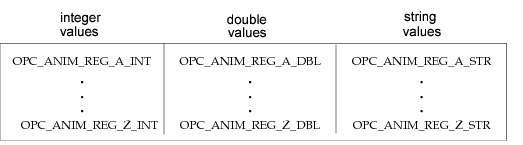
The values of registers may be used to provide the argument values for any macro request issued by an op_anim_mgp() or op_anim_mme() KP. Registers are referenced by passing special symbolic constants to the arguments of these KPs, instead of constants or expressions that are resolved to literal values. The ranges of register name symbolic constants are displayed below.
Figure 30: Macro Drawing Register Symbolic Constant Ranges
In addition to being assigned values by macro requests, registers may be assigned values by the KPs that invoke macros. The KPs op_anim_igp_macro_draw() and op_anim_igp_macro_redraw() both invoke a macro after assigning values to the macro drawing’s registers. The combination of macro invocation and register value assignment provides the required technology for parameterizing macros: the parameters of a macro are assigned values by the argument list of the macro invocation KPs, and these parameters are used as arguments for selected macro requests. The two macro invocation KPs accept variable-length argument lists that are terminated by the symbolic constant OPC_EOL, and can perform 0 to 26 register assignments in one invocation. The differences between these KPs are described below:
op_anim_igp_macro_draw()—invokes a macro specified by its macro ID, after it has allocated a drawing context with a bank of registers, and performed the required initial register assignments; this KP is intended for initially drawing a graphical object within a viewer.op_anim_igp_macro_redraw()—re-invokes the macro of an existing macro drawing, after it has performed the required update assignments to registers; this KP is intended for modifying selected properties of a macro-produced graphical object retained within a viewer, and redrawing the object to reflect these new properties.
Macros have two sections: the setup section and the graphics section. Each macro request falls into one and only one of these sections. The setup section is intended for requests that need to be performed once during the first invocation of a macro, such as a request that initializes some drawing registers based on arithmetic operations applied to the initial values of the macro's "parameter" registers. The graphics section is intended for requests that need to be repeatedly performed during re-invocations of a macro. Every macro has both sections defined, but it is common for macros to have a null setup section (i.e., to have all requests in the graphics section). By default, Mgp or Mme requests appended to the end of a macro are considered to be in the graphics section. In order for animation requests to be placed within a macro’s setup section, these requests must be appended to the macro all together before any graphics section requests, and followed by the request issued by the KP op_anim_mgp_setup_end() (the request issued by this KP demarcates the "border" in the macro request list that divides the setup section and the graphics section).
As mentioned previously, macro setup and graphics sections are executed under different conditions, based on their specific roles. The conditions leading to execution of each section are listed below:
- Under normal conditions the KP
op_anim_igp_macro_draw()executes the setup section to initialize the macro drawing, followed immediately by the graphics section, to display the macro’s graphical output for the first time. - Under normal conditions the KP
op_anim_igp_macro_redraw()re-executes only the graphics section of a macro, to redisplay the macro’s output based on new register assignments. - If the KP
op_anim_igp_macro_draw()is passed the graphical property symbolic constant OPC_ANIM_SETUP, only the setup section of a macro will be executed. The graphics section of such a macro is not executed untilop_anim_igp_macro_redraw()is explicitly applied to the macro’s drawing. - If the KP
op_anim_igp_macro_redraw()is passed the erase mode symbolic constant OPC_ANIM_ERASE_MODE_XOR_RESET, both the setup section and the graphics section of the macro will be re-executed. - A window system redraw or pop-up event may be received by the op_vuanim program, causing a redraw of animation viewers, including the viewers’ retained macro drawings. In order to redisplay these drawings, the graphics sections of their respective macros are executed.