Model Attributes
H.323 Gatekeeper Attributes
The H.323 Gatekeeper node attributes are all of the attributes which can be accessed by right-clicking on the “H323_Gatekeeper” device and selecting the Edit Attributes menu. As the Gatekeeper is specific to the H.323 network, the only attribute which needs to be configured for the H.323 protocol is the “H323” compound attribute. All other attributes are specific to the routing capabilities of the H.323 Gatekeeper and are out of scope of this guide.
Figure 145: H.323 Gatekeeper Attributes
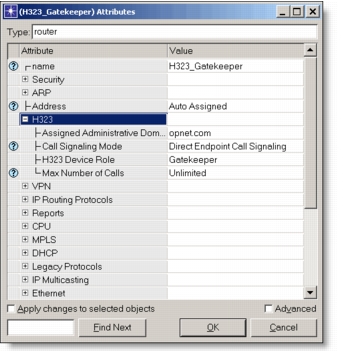
The following table lists the H.323 compound attribute in detail.
Table 59: H.323 Gatekeeper Attributes
| Attributes | Description |
|---|---|
| Assigned Administrative Domain | This attribute specifies the administrative domain for this H.323 gatekeeper. Administrative Domains specify the hierarchical nature of H.323 and can typically be looked as IP domains. A single, unique string is used to identify a single Administrative Domain. All H.323 devices which are included in the same Administrative Domain should have this attribute configured to the same string (i.e., “riverbed.com”, etc.). |
| Call Signaling Mode | This attribute specifies the call signaling mode used for this particular gatekeeper. If the user selects the “Direct Endpoint Call Signaling” option, the H.323 terminals will perform H.225 RAS signaling with this gatekeeper but will not forward the H.225 Call Signaling through this particular gatekeeper. If the user selects the “Gatekeeper-routed Signaling (GKRCS)” option, then both H.225 RAS and H.225 Call Signaling will occur through this particular gatekeeper. Note that a mix of the signaling modes between different H.323 Gatekeepers is supported. |
| H323 Device Role | This attribute specifies the role of this particular device in the H.323 network. For the H.323 gatekeeper, this attribute should always be set to “Gatekeeper.” |
| Max Number of Calls | This attribute specifies the maximum number of simultaneous calls on this H.323 gatekeeper. This allows the user to simulate certain thresholds and policies which might be implemented on a given gatekeeper. If the user selects the “Unlimited” option, there is no limit to the number of calls placed on the H.323 gatekeeper at a single time. |
H.323 Border Element Attributes
The H.323 Border Element node attributes are all of the attributes which can be accessed by right-clicking on the “H323_Border_Element” device and selecting the Edit Attributes menu. As the Border Element is specific to the H.323 network, the only attribute which needs to be configured for the H.323 protocol is the “H323” compound attribute. All other attributes are specific to the routing capabilities of the H.323 Border Element and are out of scope for this user guide.
Figure 146: H.323 Border Element Attributes
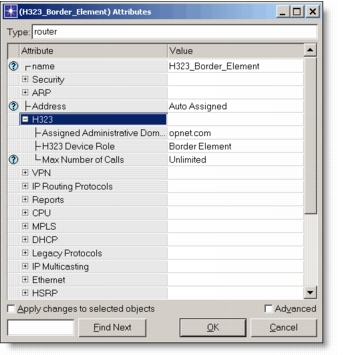
The following table lists the H.323 compound attribute in detail.
Table 60: H.323 Border Element Attributes
| Attributes | Description |
|---|---|
| Assigned Administrative Domain | This attribute specifies the administrative domain for this H.323 border element. Administrative Domains specify the hierarchical nature of H.323 and can typically be looked as IP domains. A single, unique string is used to identify a single Administrative Domain. All H.323 devices which are included in the same Administrative Domain should have this attribute configured to the same string (i.e., “riverbed.com”, etc.). Note that only a single border element can be placed in one administrative domain. |
| H323 Device Role | This attribute specifies the role of this particular device in the H.323 network. For the H.323 border element, this attribute should always be set to “Border Element.” |
| Max Number of Calls | This attribute specifies the maximum number of simultaneous calls on this H.323 border element. This allows the user to simulate certain thresholds and policies which might be implemented on a given border element. If the user selects the “Unlimited” option, there is no limit to the number of calls placed on the H.323 border element at a single time. |