Model Attributes: EIGRP
All nodes that can run the EIGRP protocol have an IP Routing Protocols > EIGRP Parameters attribute to specify EIGRP configuration parameters. The main EIGRP attributes are described below.
AS Parameters
Specifies EIGRP parameters for each process. Create a separate row in the AS Parameters table for each autonomous system. Make sure that each AS appears only once, since only one process can be configured for each autonomous system. The following attributes are configured in the Process Parameters compound attribute.
-
Start Time. Determines the simulation time when EIGRP activities start by sending initial hellos. If this attribute is set to a relatively high value (compared to the start times of its neighbors), the process joins the network in a delayed manner. This can be useful for modeling situations such as the addition of a new router to an existing steady-state network.
-
Variance. Specifies the variance allowed on the metrics of the routes kept in the route table. If:
Route Metric < (Variance x Best Metric for the destination)
the route is stored in the route table. When the variance is set to a value greater than “1”, EIGRP performs load balancing between the “good” routes and the “best” routes to destinations.
-
Traffic Share. Specifies how traffic is distributed when there are multiple routes of different costs to the same destination. For routes to a given destination, “Balanced” distributes traffic proportionately to the ratios of the metrics whereas “Minimum” distributes traffic evenly among the minimum cost routes.
-
Passive Interfaces. Lists the router’s passive interfaces. These interfaces do not send or receive EIGRP hello messages.
-
Metric Parameters. Specifies parameters (K1, K2, K3, K4, and K5) used to compute the composite EIGRP metric. This metric is computed as the following:
For K5 ≠ 0,

For K5 = 0,
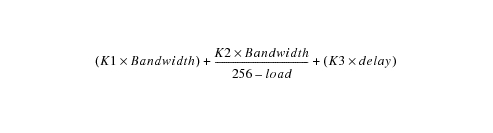
For the default K values, K1=K3=1, K2=K4=K5=0, the previous equation reduces to:
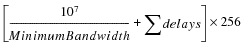
-
Redistribute. Configures how routes from other routing protocols are redistributed into EIGRP.
-
Route Filter. Configures route filtering for incoming or outgoing routes based on prefix lists. To specify a route filter, you must first define the prefix list it uses in the IP > IP Routing Parameters > Prefix Filter Configuration attribute. This attribute filters routes for the entire router. However, you can also use the Route Filter attribute in the Interface Information table to filter routes on a per-interface basis.
Interface Information
Specifies attributes on a per-interface basis. The Status sub-attribute indicates whether or not EIGRP is enabled on the interface. To change this value, use the Protocols > IP > Routing > Configure Routing Protocols operation to enable EIGRP on the interfaces. You can also change the EIGRP status by manually setting the IP > IP Routing Parameters > Interface Information > Routing Protocols attribute to enable or disable EIGRP on the desired interface(s).
-
Hello Interval. Determines the time interval between hello messages. A high value lowers the EIGRP traffic in steady state, and a low value enables node failures to be detected more quickly.
-
Hold Time. Specifies the value of hold time, which is advertised in the hello message sent over the corresponding IP interface. The hold time value defines the amount of time a neighbor should wait for another hello message from this process model before marking its node as down. A high hold time value delays the detection of node failures, and a low value may cause misjudging the status of a neighbor as down because of a few delayed or dropped hello packets.
-
Split Horizon. Enables or disables split horizon on the interface. The default configuration enables this feature on all interfaces.
-
Route Filters. Specifies the prefix/distribute lists used to filter routes received on or sent from this interface. Prefix/distribute lists are defined in the IP > IP Routing Parameters > Prefix Filter Configuration attribute.
-
Loopback Interfaces. Specifies the autonomous system numbers for the loopback interface(s) for the router’s loopback interfaces. From the Name pull-down menu, select a loopback interface (defined in the IP > IP Routing Parameters > Loopback Interfaces attribute). Setting the Name automatically sets the corresponding Address and Subnet Mask. Use the AS(es) field to associate the loopback interface with a particular autonomous system.