Compiling a Wireless Domain Model
This section contains descriptions of the operations used to compile a wireless domain model.
Compile Code
The Compile > Compile Code operation generates object code from the source code defined in the code blocks of the wireless domain model. It invokes the compiler specified by either the “comp_prog” preference or, if Enable C++ Code Generation is set, the “comp_prog_cpp” preference. You must compile a wireless domain model before using it in a network model.
Compile Code (Advanced)
The Compile > Compile Code (Advanced) operation compiles the wireless domain model as does the Compile Code operation, but first provides a convenient interface (Figure 84) for specifying the types of object file to produce, compiler settings, and debugging support to include in the compiled code. You can save the settings specified in this dialog box to your preferences for future use; if not saved, they remain effective only until the Wireless Domain Editor is closed.
Figure 84: Compilation of Wireless Domain Model Dialog Box
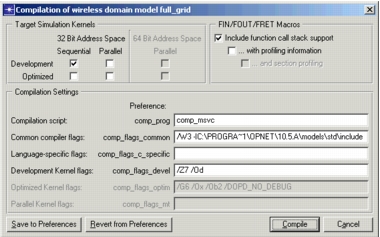
When you click the Compile button, all the separate code elements from the wireless domain model are assembled to create a single source code file for the wireless domain. It then uses the host machine’s C or C++ compiler to produce one object file for each target simulation kernel selected.
Enable C++ Code Generation
The Compile > Enable C++ Code Generation operation toggles a flag that indicates whether C or C++ code should be generated when the wireless domain model is compiled.
List Code
The Compile > List Code operation opens an edit pad containing the complete source code for the wireless domain model. This is the source file that is compiled to create the object code for the wireless domain model.