Clearing and Deleting Segments of a File
You can select a portion of a file and clear it or delete it. Clearing a portion of a file removes all packets within the selection, but does not change the timestamps of the packets that follow the cleared section. The result is empty space in the file.
If you delete a section of a file, all packets and any associated annotations are removed. The packets that come after the deleted section are offset to fill in the empty space. If a range annotation spans the deleted section its start point or end point is offset to the appropriate amount of time.
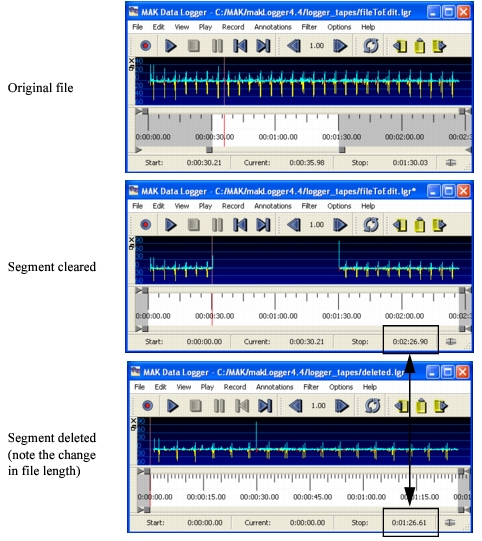
Figure 153 shows a logger file with the segment from 0:30 to 1:30 selected for editing. If the segment is cleared, the file stays the same length, but there are no messages in the cleared segment. If the segment is deleted, the file is shortened by the amount of time deleted. There is no dead space in the file.
Figure 153: Clearing and deleting file segments
The Logger adds data, if necessary, to properly remove or add objects that are affected by a clear or delete operation.
Note: When you delete a portion of a file, it does not get placed on the clipboard. You cannot paste it back into the file.
Procedure 180: Clearing a Portion of a File
- Open the file.
- Use the timeline sliders to select the segment you want to clear.
- Choose Edit > Clear Section.
Procedure 181: Deleting a Portion of a File
- Open the file.
- Use the timeline sliders to select the segment you want to delete.
- Choose Edit > Delete Section.
- Save the edited file.