Adding Traffic to the TDMA Network Model
Once the network topology is built, you can add traffic to the network. You can do this using standard applications (such as FTP or E-mail), raw packet generation, or with traffic demands.
Note: Background traffic is not supported for TDMA models.
Using Standard Applications
You can configure standard applications, such as FTP and E-mail, to generate traffic in your network model. Application support is included in the TDMA workstation nodes. For more information on the configuring standard applications, see "Standard Applications Supported by Application Models".
Raw Packet Generation
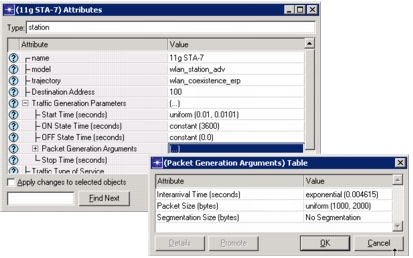
TDMA station nodes can perform raw packet generation in the network model. To use raw packet generation, configure the Traffic Generation Parameters attribute on TDMA stations, as shown in the following figure.
Figure 569: Raw Packet Generation
Using Traffic Demands
There are two ways to add demands in a TDMA network model.
- Choose an IP demand from the "demands" object palette
- Create traffic flows from the Traffic menu
After adding demands to the network, you should configure them to use a traffic mix consisting of 100% explicit traffic (and no background traffic) so that they will be considered by the TDMA models in the network. You can find out more about how to add and configure traffic demands and flows to a network in Chapter 5 "Modeling Network Traffic" on page 1.