Mainframe Attributes
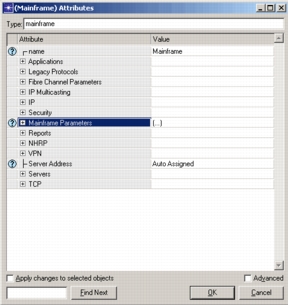
In addition to the Mainframe Configuration attributes, a number of attributes are provided on the individual mainframes. These affect only the mainframe on which they're specified, although in many cases they rely on information provided in the Mainframe Configuration object.
Figure 353: Mainframe Modeling Attributes on Mainframe Nodes
-
Servers > Server: Modeling Method. For compatibility with the existing application models, and for those occasions when mainframe modeling is not necessary, you can select which modeling method is right for your scenario.
- Simple CPU. This method uses a simple contention model to simulate server activity. It is identical to previous models. Use this setting when using the standard network application models, such as FTP or HTTP.
- Detailed Server. The detailed server modeling method uses the advanced modeling capabilities. A specialized license is required to run in Detailed Server mode.
- Mainframe. This uses the mainframe modeling capabilities described in this document. A specialized license is required to run in Mainframe mode.
-
Reports > Mainframe Workload Activity Table. This attribute controls the generation of the workload activity table report for this node.
-
Mainframe Parameters. A description of the hardware and workload group configuration is given by this attribute. A detailed description of the subattributes follows.
Figure 354: Mainframe Parameters Attributes
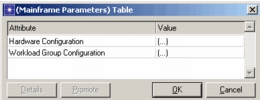
- Hardware Configuration. This attribute specifies the mode in which mainframe operates and the configuration of the machine based on that mode.
- Workload Group Configuration. Once the hardware configuration is complete, this attribute is used to specify the workload groups and their configurations.
-
Hardware Configuration.
Figure 355: Hardware Configuration Attributes
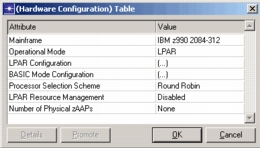
- Mainframe. Name of the model mainframe which this node represents.
- Operational Mode. The node could be operating in the BASIC mode in which case there will be just one logical partition or it could be operating in LPAR mode, where there can be multiple logical partitions.
- LPAR Configuration. This attribute describes the configuration of the LPAR cluster.
- BASIC Mode Configuration. If the node is operating in BASIC mode, this attribute describes the configuration.
- Processor Selection Scheme.Processor selection can be Round Robin or First Available. If set to Round Robin, all processors are equally utilized. If set to First Available, the first few available processors will be used more than the rest.
- LPAR Resource Management. If the node is operating in LPAR mode, we can enable / disable the dynamic management of resources and also specify how often this operation should be done.
- Number of Physical zAAPs. Specifies the number of physical zSeries Application Assist processors on this system.
-
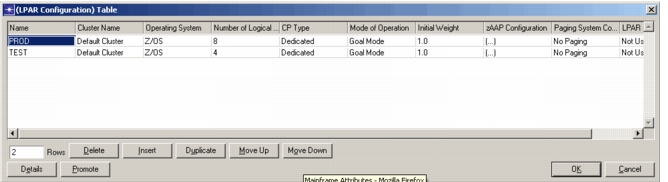
LPAR Configuration. This attribute describes the manner in which the logical partitions are defined for the mainframe node.
Figure 356: LPAR Configuration Attribute
-
Name. Name of the logical partition. This should be unique. It will be used to specify under which LPAR does a given workload group runs.
-
Cluster Name. Name of the cluster to which this logical partition belongs.
-
Operating System. This specifies the operating system running on this logical partition.
-
Number of Logical CPs. This specifies the number of logical processors (CPs) running under this partition. The number of LCPs for a given logical partition cannot be more than the total number of physical processors on the system.
-
CP Type. The CPs can be shared among various logical partitions or they can be dedicated for this logical partition. The total number of dedicated CPs for all the logical partitions cannot be more than the number of the physical CPs in the system.
-
Mode of Operation. The logical partition can operate in Compatibility or Goal Mode or it can act as a Coupling Facility.
-
Initial Weight. Initial weight of the logical partition. When running in Goal Mode, this is used to determine the dispatching priority of the logical CP to the physical CP for all the partitions under the same cluster.
-
zAAP Configuration
Figure 357: zAAP Configuration Table
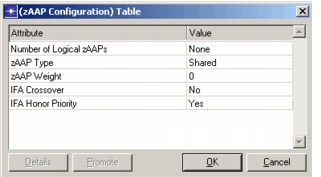
Number of Logical zAAPs. Specifies the number of logical zAAPs on this mainframe, not to exceed the number of physical zAAPs.
zAAP Type. Specifies whether this zAAP is to be shared among the LPARs or dedicated to a single physical zAAP.
zAAP Weight. Specifies the weight to be used when sharing the physical zAAP processors available on the system.
IFA Crossover. Specifies whether to allow the zAAP workload to also be performed by standard processors. If this parameter is set to “No,” the zAAP workload is only shared with standard processors if there are no zAAPs available.
IFA Honor Priority. Specifies if the Workload Manager should honor the priority of the zAAP work on general purpose CPs. If set to “No,” zAAP eligible work that runs on a standard processor will run at a lower priority.
-
Paging System Configuration. This attribute specifies the paging system for this partition.
Average Processing Time. Average amount of processing time required with single paging operation.
Page I/O Count. Number of I/O operations associated with a page fault which requires I/O operation.
Page Size. Size of the I/O page.
Aux Hard Fault Percentage. Specifies the number of auxiliary page faults which are hard faults (require I/O operation) as a percentage of the total page faults generated by the application.
Exp Hard Fault Percentage. Specifies the number of expanded page faults which are hard faults (require I/O operation) as a percentage of the total page faults generated by the application.
-
LPAR Capping. This attribute is used to enable or disable this function. If capping is enabled, when the limit to the amount of resources that should be allocated for this partition has been reached, even if there are more resources available, they will not be used.
-
-
BASIC Mode Configuration. If the mainframe is operating in the BASIC mode, this attribute is used specify the following attributes.
Operating System. Operating system running on this mainframe.
Paging System Configuration. It specifies the paging system for the entire mainframe using the same attributes as described for the LPAR Configuration.
-
Workload Group Configuration.
Figure 358: Workload Group Configuration Attribute
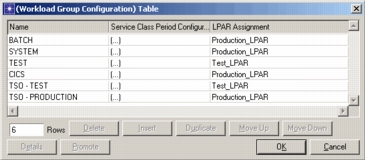
- Name. Name of the workload group.
- LPAR Assignment. Name of the LPAR under which this workload group will be running.
- Service Class Period Configuration. List of service class periods configured for this workload group.
Figure 359: Service Class Period Configuration Attribute
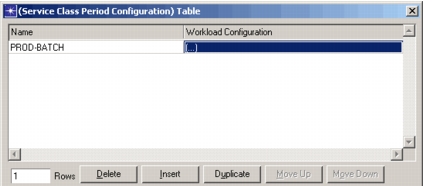
Name. Name of the Service Class. They are defined in the Mainframe Configuration object.
Workload Configuration. List of workloads configured under a given service class period.
-
Workload Configuration.
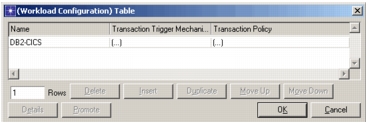
Figure 360: Workload Configuration Attribute
-
Name. Name of the workload. They are defined in the Mainframe Configuration object.
-
Transaction Trigger Mechanism. This attribute specifies the method by which transactions for this workload will be executed. In can either be triggered by the application or it can be started internally in which case the following attributes can be used to configure the starting and stopping the transactions.
Start Time. Time at which the transactions for this workload will start executing.
Number of Transactions. Total number of transactions that need to be executed for this workload.
Transactions per Second. Number of transactions that are executed per second.
Duration. Duration for which transaction will keep getting executed. This attribute along with the number of transactions determine the lower limit on the total number of transactions that are executed for the given workload.
-
Transaction Policy. This attribute specifies the following
Number of Parallel Transactions. Number of parallel transactions that can be executed for this workload.
Transaction Limit Policy. Once the limit to the number of parallel transactions is reached, the new transaction can either be queued or it can be rejected based upon this attribute.
Number of Threads. This attribute specifies the number of threads into which this transaction can be broken down.
-