Importing APS Configuration Information from NetCollector
To include APS in a network model, you need to import the APS configuration from NetCollector. APS attributes in Riverbed Modeler are configured based on output from the following show commands:
show running config(includes APS configuration information)show aps(used to obtain supplemental information about the operational status of the APS interfaces)
To collect the APS information on NetCollector, use the Device APS Import adapter.
For more information on importing network information from NetCollector, see “Import from NetCollector”.
The imported network model includes APS configuration details in the APS Parameters attribute on the IP interfaces.
Figure 73: APS Parameters Attributes
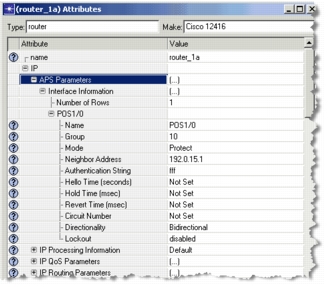
The APS groups are named according to their APS group number and the names of the two connected routers.
Format for APS group names:
APS:<group_number> / working:<working_router_name>
You can easily differentiate the working links from the protect links in the workspace:
- Working links appear as solid lines
- Protect links appear as dotted lines
A dotted red line indicates that the protect link is administratively down, as shown in Figure 74.