Support for QoS Traffic
Using the Bridge Parameters and the Switch Port Configuration attributes, you can configure QoS port traffic schemes. At the node level, the model includes QoS configuration of four default ports. You can set attributes at the node level with default settings for each port, or you can specify settings for each port. Figure 544 shows the QoS attributes for a switch node.
Figure 544: QoS Configuration for Switch Nodes
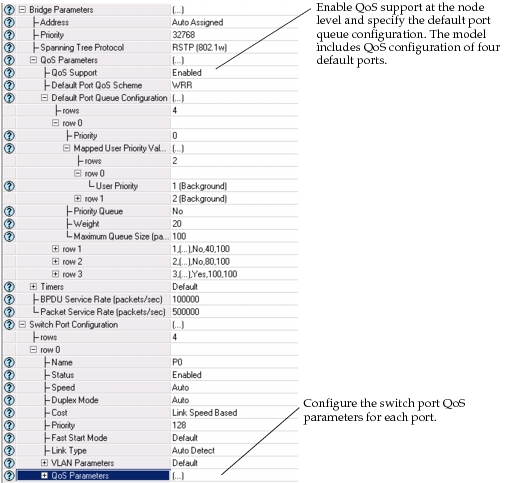
The following section describes the Switch Port Configuration attributes.
Note: QoS support must be enabled at the node level for Riverbed Modeler to consider the QoS parameters at the port level.
-
Qos Parameters. Specifies the QoS configuration of a queue. This attribute is considered only for the ports.
-
Port User Priority. Specifies the user priority value assigned to the packets that are received through this port that do not carry any tags. If the received packet carries a tag, which contains VLAN and user priority information, then the packet user priority is determined based on the value in the tag.
If the value is set to “Retain IP Precedence”, then the user priority of the packets received untagged will be equal to the value of the IP Precedence bits in their IP headers. If the received packet is not an IP datagram or does not encapsulate an IP datagram, then the user priority of such a packet will be considered as 0 (Best Effort). Hence, this special value should not be used for the ports that are expected to receive untagged non-IP traffic that should not be treated as “Best Effort” traffic.
-
QoS Scheme. Specifies the priority queuing scheme that will be used by the port while forwarding packets to its MAC.
When the value is set to MWRR (or WRR), then the actual queuing scheme will be LLQ/MWRR (LLQ/WRR) if there is also a queue designated as the priority queue under queue configuration. Otherwise, MWRR (WRR) will be deployed as the queuing scheme across all the defined queues.
Setting the value to “Use Node Default” makes the port deploy the scheme that is configured as the default scheme for all ports of the node using the attribute “Bridge Parameters -> QoS Parameters -> Default Port QoS Scheme”.
-
Queue Configuration. Specifies the configuration of output traffic priority queues that will be used by the port while forwarding data traffic to its MAC.
Setting the value to “Use Node Default” makes the port deploy the queue configuration that is specified as the default configuration for all ports of the node using the attribute “Bridge Parameters -> QoS Parameters -> Default Port Queue Configuration”.
Description. Brief name of the mapped priority such as video or a controlled load.
Priority. Specifies the priority of the queue when the “strict priority” queuing scheme is deployed. A higher numerical value indicates a higher priority.
The same priority value should not be shared by two or more queues. If two or more queues have the same priority value, they will not have the same priority, since this is not allowed by the strict priority scheme. Instead, the model randomly assigns relative priorities to those queues with the same priority value.
Mapped User Priority. Specifies the list of user priority values mapped to this queue. Data traffic packets that are assigned to one of these user priorities will be buffered in this queue (when there is sufficient buffer space).
-
Priority Queue. This attribute value is used only if the queuing scheme is WRR (Weighted Round Robin) or MWRR (Modified WRR). It specifies whether any queue needs to be treated as a top priority queue and separated from others when WRR (MWRR) is executed. In other words, if this attribute is set to “Yes” for any queue, then that queue is given the highest priority and WRR (MWRR) is applied to the remaining queues only when that queue is empty. Hence, such a setting will change the scheme from WRR to LLQ/WRR (WRR with Low Latency Queue) or from MWRR to LLQ/MWRR.
This attribute must be set to “Yes” only for a maximum number of one queue. If no queue is specified as “Priority Queue” using this attribute, then WRR will be applied to all queues based on their weights.
-
Weight. Specifies the weight of the queue, which is taken into consideration when the queuing schemes WRR or LLQ/WRR are used. Hence, a relatively higher weight value indicates a higher priority.Maximum Queue Size.
-
-
Maximum Size. Specifies the buffer size of the queue in packets.
QoS Statistics
Statistics collected for each queue of each port:
- Buffer Usage (bytes)
- Buffer Usage (packets)
- Queue Delay (sec)
- Queuing Delay (sec)
- Traffic Dropped (bits/sec)
- Traffic Dropped (packets/sec)
- Traffic Received (packets/sec)
- Traffic Sent (bits/sec)
- Traffic Sent (packets/sec)