Ets_Pj_Output_Files_Chooser_Dbox_Open()
Note: Requires OPNET Development Kit
Abstract
Opens a files chooser dialog box for selecting one or more output files.
Syntax
Ets_Pj_Output_Files_Chooser_Dbox_Open (in_files_lptr, chooser_callback, callback_state_ptr, dbox_title_str, ok_button_title_str, options)
| Argument | Type | Description |
|---|---|---|
in_files_lptr |
PrgT_List * |
List of at least two output files to be presented to the user. |
chooser_callback |
EtsT_Pj_Output_Files_Chooser_Callback |
Callback to be invoked when the user clicks the OK button in the files chooser dialog box, or OPC_NIL to disallow file selection (see Details). |
callback_state_ptr |
void * |
User-specified information to be passed to the callback procedure. |
dbox_title_str |
const char * |
Title for the dialog box. If null, the default title “Output Files Chooser” is used. |
ok_button_title_str |
const char * |
Title for the OK button. If null, the default title “OK” is used. |
options |
int |
Options for the dialog box (see options). |
Return Type
void
No return value.
Header
ets_api_pj.h
Example
PrgT_List * result_files_lptr = prg_file_output_files_list_get (type,
   project_scenario_name, suffix);
int   list_size;

if (!result_files_lptr || prg_list_size (result_files_lptr) == 0)
   {
   // Generate error message that no results are produced.
   // Result files lptr is NIL, so no need to destroy the list.
   }
else if (prg_list_size (result_files_lptr)== 1)
   {
   <chooser_callback> (state_ptr, result_files_lptr);
      //Callback destroys the result_files_lptr list, including its elements.
   }
else
   {
   Ets_Pj_Output_Files_Chooser_Dbox_Open (result_files_lptr, call_back,
      call_back_state_ptr, title_str, ok_button_title_str, options);
   // Destroy the list, including its elements.
   prg_list_destroy (result_files_lptr, 1);
   }
Details
This function displays a dialog box that correlates results files with invocation data (parameter values) and allows a user to choose desired results for display. One use of this function is to simply setting up a parametric study graph.
Usually the dialog box is opened in selection mode, with OK and Cancel buttons. The list of files is displayed hierarchically by name in the treeview. If the files represent multiple simulation runs, differences in parameter values are displayed to the right of the files. In selection mode, the user can select one or more files (depending on options) that will be displayed or otherwise processed by chooser_callback when the user clicks the OK button.
Figure 11: Example Files Chooser Dialog Box (Selection Mode)
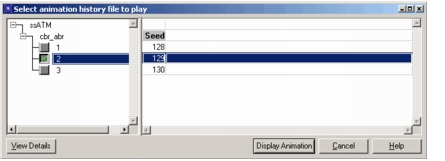
If no chooser_callback is specified, the dialog box is opened in display mode. In this mode, the OK and Cancel buttons are replaced by a Close button and file selection is not allowed.
options
options must be one of the following constants:
ETSC_PJ_OUTOUT_FILES_CHOOSER_OPTIONS_NONE—only one file can be selectedETSC_PJ_OUTOUT_FILES_CHOOSER_ALLOW_MULTIPLE_SELECTIONS—allows the user to select multiple files (by default, only one file can be selected)
The prototype for the callback is given at EtsT_Pj_Output_Files_Chooser_Callback.