Licensing Mode
When you install Riverbed analysis software, you are asked to choose a licensing mode, as shown in the following figure.
Figure 2: Licensing Options at Installation
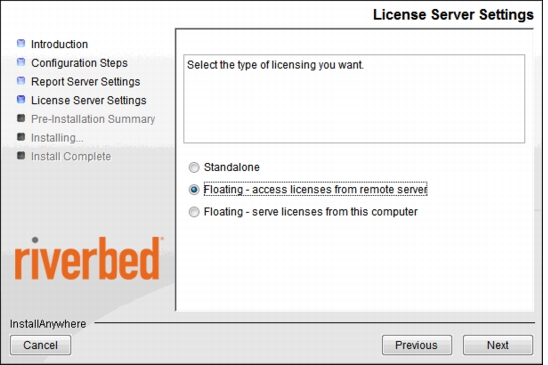
The following table lists the use cases for each type of licensing.
Table 2: Licensing Modes
| Licensing Scheme | Use Case |
|---|---|
| Standalone (See Standalone Licensing) | • Riverbed analysis software products will be used only on the computer where the license is installed • All discrete event simulations (DES) will be launched from the Riverbed analysis software GUI, rather than from a command line or from a script • 3DNV is not used |
| Floating (See Floating (Workgroup) Licensing) | • You want to share a license among several users in the same IP network[^1] • You want to run DES from command line, script, or batch file (outside the context of the Riverbed analysis software GUI) |
[^1]: if you need to support computers that are on different IP networks, contact your Riverbed account manager to purchase an enterprise license.
Note: (Riverbed analysis software) To change licensing modes, you must reinstall the latest version of the software from your product CD or from a downloaded version obtained from technical support. Normally this is all that is required to change the licensing scheme. However, if you previously used Edit > Preferences to change the value of the
license_server_standalone preference, you must manually setlicense_server_standaloneto the correct value after reinstalling the software.
Standalone Licensing
In the standalone configuration Riverbed analysis software acts as its own License Server, accessing the license directly without any intermediary program. When you use standalone mode, Riverbed analysis software may only be run on the computer on which the license is installed.
Floating (Enterprise) Licensing
In the floating configuration, op_license_server executes on a host computer that is accessible to the clients it serves.
Multiple license servers can run on the same IP network, each allocating different licenses. You cannot register a license to more than one license server, however. For example, if one license server allocates licenses 100-1 through 100-10, another license server cannot allocate those same licenses.
With enterprise licensing, you can also support clients that are on IP networks other than the network containing the license server.
Note: Enterprise licensing is available for Riverbed Modeler, but is not included by default. Contact your Riverbed account manager for more information.
Floating (Workgroup) Licensing
In the floating configuration, op_license_server executes on a host computer that is on the same classful IP network as the clients it serves.
Note: The license server and clients must be in the same classful IP network. Therefore, unless the license server and the client have the same network address, licenses cannot be issued. If you need to have a licensing scheme that supports having the license server and the clients in different IP networks, contact your Riverbed account manager about enterprise licensing.
Multiple license servers can run on the same IP network, each allocating different licenses. You cannot register a license to more than one license server, however. For example, if one license server allocates licenses 100-1 through 100-10, another license server cannot allocate those same licenses.
Loanable Licensing
Note: Loanable licenses are no longer offered with Transaction Analyzer.
Loanable licenses can be temporarily transferred an unlimited number of times from one license server to another, without the assistance of technical support. This is useful for providing licenses to applications that will be run on a portable computer or at a remote site that doesn't have network access, without needing to register a license for that computer.
It is important to note when loaning a license that a "day" is defined as 24 hours. If a license is loaned at 10:00AM on Monday for a duration of one day, the loan expires on the loanee's computer at 10:00AM on Tuesday. For loans of more than one day, the number of days specified is multiplied by 24 hours to determine the end of the loan period.
A simplified method of managing loanable licenses is built into the License Manager. For details, see "License Operations for Loanable Licenses" on page 67.