Ets_Shape_Arc_Create()
注意: 需要 OPNET Development Kit
摘要
创建一个新的圆弧形状。
语法
Ets_Shape_Arc_Create (arc_box, angle1, angle2, line_width, line_style, line_color)
| 参数 | 类型 | 说明 |
|---|---|---|
arc_box |
EtsT_Shape_Rect |
定义一个椭圆的矩形,目标圆弧是该椭圆的一段。坐标盒的详细说明见 Table 26。 |
angle1 |
double |
圆弧起始的角度,单位为度。 |
angle2 |
double |
圆弧终止的角度,单位为度。 |
line_width |
int |
线的宽度,单位为像素。 |
line_style |
EtsT_Shape_Line_Style |
线的样式,取 EtsC_Shape_Line_Solid 或 EtsC_Shape_Line_None(不可见)。 |
line_color |
EtsT_Color |
线的颜色。详见 Shape Colors。 |
返回类型
EtsT_Shape_Handle
新形状的句柄。
头文件
ets_api_shapeset.h
详情
创建一个新的圆弧形状。圆弧是椭圆上的一段,该椭圆内接于 arc_box 指定的矩形,并由 angle1 和 angle2 界定,如图 6所示。
图 6:指定圆弧形状
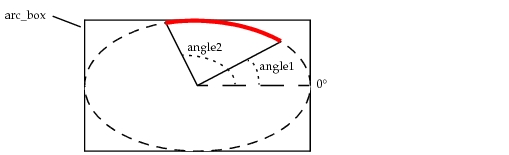
在上图中,由 arc_box、angle1 和 angle2 指定的圆弧以粗红线标示。注意角度从 0° 起沿逆时针方向测量。