Sample Program
This section contains a sample program that uses the prg_log and Ets_Log APIs (the Ets_Log API is available only to OPNET Development Kit users). The sample program demonstrates the following workflow:
- Open a log with a unique log name.
- Check if the template exists.
- If not, define the template by setting the log columns and types.
- Set the maximum number of rows maintained.
- Set the maximum number of rows per file.
- Write to the log store.
- Create a log handle.
- Write to the log handle.
- Open a log viewer in live mode.
- Continue writing to the log.
- Close the log.
- Reopen the log.
- Open another log viewer in standard mode.
- Close the log, saving the contents to XML.
- Add a filter to the log.
DLLEXPORT void
simple_log_test (void)
	{
	PrgT_Log_Store_Handle store_ptr = PRGC_NIL;
	PrgT_Log_Handle       handle_ptr = PRGC_NIL;
	EtsT_Dbox             *live_viewer;
	EtsT_Dbox             *viewer;
	int                   i;
	char                  buffer [512];
	int                   entry_count = 0;

	FIN (simple_log_test);

	// Open log in write mode
	store_ptr = prg_log_open ("simple_log", PRGC_NIL, PRGC_LOG_OPEN_OPT_WRITE |
		PRGC_LOG_OPEN_OPT_INCLUDE_SEVERITY, PRGC_NIL);
	if (store_ptr == PRGC_NIL)
		{
		printf ("\n** Simple Log Open Failed **\n");
		FOUT;
		}

	// Define columns if needed
	//
	// Log template is: | Severity | Entry Count | Subnet | Node | Note |
	//
	if (!prg_log_template_exists (store_ptr))
		{
		prg_log_column_add (store_ptr, "Entry count", PRGC_NIL,
			PrgC_Log_Value_Type_Integer);
		prg_log_column_add (store_ptr, "Subnet", "Subnet = %s",
			PrgC_Log_Value_Type_String);
		prg_log_column_add (store_ptr, "Node", "Node = %s",
			PrgC_Log_Value_Type_String);
		prg_log_column_add (store_ptr, "Note", "%s", PrgC_Log_Value_Type_String);

		// set no limit on the number of log entries
		prg_log_max_log_rows_set (store_ptr, PRGC_LOG_SIZE_NO_LIMIT);

		// set node as a child of subnet in the viewer
		prg_log_column_child_dependency_add (store_ptr, "Subnet", "Node");
		}


	// write to log store with no options
	prg_log_write (store_ptr, PRGC_LOG_WRITE_OPT_NONE,
		PrgC_Log_Value_Type_Severity, PrgC_Log_Severity_Information,
		PrgC_Log_Value_Type_Integer, entry_count++,
		PrgC_Log_Value_Type_String, "none",
		PrgC_Log_Value_Type_String, "none",
		PrgC_Log_Value_Type_String, "Log opened for writing!");

	// write to log store with column name option
	prg_log_write (store_ptr, PRGC_LOG_WRITE_OPT_COLUMN_NAME,
		"Note", PrgC_Log_Value_Type_String, "Starting to add log handle.",
		PrgC_Log_Col_Name_Severity, PrgC_Log_Value_Type_Severity,
		PrgC_Log_Severity_Notice, PRGC_NIL);


	// Open log handle for subnet dc, node bethesda
	handle_ptr = prg_log_handle_generate (store_ptr, 5,
		"Subnet", PrgC_Log_Value_Type_String, "DC",
		"Node", PrgC_Log_Value_Type_String, "Bethesda", PRGC_NIL);
	if (prg_log_handle_valid (handle_ptr))
		{
		// only the first 5 of the 10 will be added to the log
		for (i = 0; i < 10; i++)
		    {
			sprintf (buffer, "Test: entry %d of 10\n"
				"Only the first 5 will show up in the log", i+1);

		    // Log handle write with no options
			prg_log_handle_write (handle_ptr, PRGC_LOG_WRITE_OPT_NONE,
				PrgC_Log_Value_Type_Severity, PrgC_Log_Severity_Debug,
				PrgC_Log_Value_Type_Integer, entry_count++,
				PrgC_Log_Value_Type_String, buffer);
			}

		// free the log handle
		prg_log_handle_destroy (handle_ptr);
		}

	// Open the live viewer - set latest entries to first for live mode
	live_viewer = Ets_Log_Dbox_Open ("Live viewer",
		ETSC_LOG_DBOX_OPT_LATEST_FIRST | ETSC_LOG_DBOX_OPT_SHOW_COLORS, store_ptr);


	// Open a handle for warnings
	handle_ptr = prg_log_handle_generate (store_ptr, 200,
		PrgC_Log_Col_Name_Severity, PrgC_Log_Value_Type_Severity,
		PrgC_Log_Severity_Warning, PRGC_NIL);

	//The following two writes will appear in the log live
	if (prg_log_handle_valid (handle_ptr))
		{
		// write to the log handle with column name option
		prg_log_handle_write (handle_ptr, PRGC_LOG_WRITE_OPT_COLUMN_NAME,
			"Node", PrgC_Log_Value_Type_String, "Bethesda",
			"Note", PrgC_Log_Value_Type_String, "Node down.",
			"Entry count", PrgC_Log_Value_Type_Integer, entry_count++,
			PRGC_NIL);

		// write with no column option
		prg_log_handle_write (handle_ptr, PRGC_LOG_WRITE_OPT_NONE,
			PrgC_Log_Value_Type_Integer, entry_count++,
			PrgC_Log_Value_Type_String, "DC",
			PrgC_Log_Value_Type_String, "Rockville",
			PrgC_Log_Value_Type_String, "Node up.");

		// free the log handle
		prg_log_handle_destroy (handle_ptr);
		}

	// Close the open log, the viewer will not recieve any more live updates
	prg_log_close (store_ptr, PRGC_LOG_CLOSE_OPT_KEEP_OLD_FILES);


	//
	// Reopen the log to see it in a standard viewer, with date hidden
	//
	store_ptr = prg_log_open ("simple_log", PRGC_NIL,
		PRGC_LOG_OPEN_OPT_READ | PRGC_LOG_OPEN_OPT_HIDE_DATE, VOSC_NIL);

	viewer = Ets_Log_Dbox_Open ("Off-line viewer", ETSC_LOG_DBOX_OPT_NONE,
		store_ptr);

	// Close the log. This will remove the old files and export the log
	// to xml (simple_log.xml will be created in op_models)
	prg_log_close (store_ptr, PRGC_LOG_CLOSE_OPT_EXPORT_TO_XML);

	// Add a filter to the log
	if (viewer != PRGC_NIL)
		{
		EtsT_Log_Table_Filter *filter_ptr;

		// hide the count column
		Ets_Log_Dbox_Column_Options_Set (viewer, "Entry count",
			ETSC_LOG_COLUMN_OPT_HIDE);

		// Make subnet the color key and filterable
		Ets_Log_Dbox_Column_Options_Set (viewer, "Subnet",
			ETSC_LOG_COLUMN_OPT_COLOR | ETSC_LOG_COLUMN_OPT_FILTER);

		// Make node filterable
		Ets_Log_Dbox_Column_Options_Set (viewer, "Node",
			ETSC_LOG_COLUMN_OPT_FILTER);

		// Filter the log to only show rows with node = bethesda
		filter_ptr = Ets_Log_Filter_Create (viewer);
		if (Ets_Log_Filter_Rows_Include (filter_ptr, "Node",
			PrgC_Log_Value_Type_String, "Bethesda") == PrgC_Compcode_Failure)
			{
			// invalid filtering, so free the memory
			Ets_Log_Filter_Destroy (filter_ptr);
			}
		else
			{
			// apply the filter to the viewer
			Ets_Log_Dbox_Filter_Apply (viewer, filter_ptr);
			}
		}
	FOUT;
	}
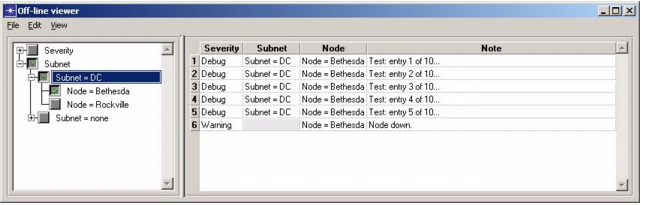
The following figures show the two viewers created by the preceding sample program.
Figure 1: Live Mode (Last Entry Appears First)
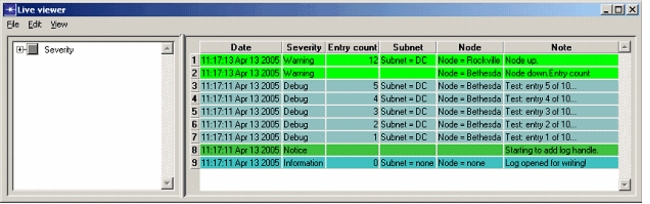
Figure 2: Standard Mode (First Entry Appears First)