ETS Output Package Overview
Note: This package was originally provided for accessing Flow Analysis output tables, but can also be used for other output tables, including discrete event simulation and loads-to-flows.
Flow Analysis is capable of generating a large amount of detailed information. This information is potentially useful to a large number of Flow Analysis clients (design actions, protocol utilities, visualizations, exports, and so on). Some of this information can be accessed directly from memory using Odan_Flan APIs. Other information is only available from the output table reports. The Oma_Ot package provides functions to read output table (.ot) files. In some cases, directly harvesting the data using the Oma_Ot package (“OMA Output Table Package“) is the best approach. There are some limitations when retrieving the data directly:
- The client code is directly tied to the format and structure of the Flow Analysis output table. Any changes will break the client code.
- The output tables provide sequential access in a row-by-row format. The Oma_Ot package does not provide object-oriented access to the data.
- Some values in the table are multi-keyed (for example, node and interface name). The Oma_Ot package does not directly support finding values based on keys rather than simply row, column values.
The ETS Output package is a layer of abstraction built on top of OMA OT to efficiently address these limitations. This package is intended to allow access to registered output values in a way that follows the conventions for accessing attributes with Ets_Obj_Attr_Get().
The ETS Output package has three groups of functions:
- Functions for publishing a registered output value (Value-Publishing Functions)
- Functions for accessing a registered output value (Client Functions)
- Functions for implementing a value-registering callback (Callback-Implementation Functions)
If the location or format of the data changes, only the registration of the output value needs to change. The client code can remain unchanged.
The ETS Output package supports accessing data in OT files only. Each value must be in a global table in the OT file (rather than an object table). The row in the global table must have a hot-linked cell that can be used to indicate the object that corresponds to the row (or it must inherit a previous row’s value).
This package uses the following data structures:
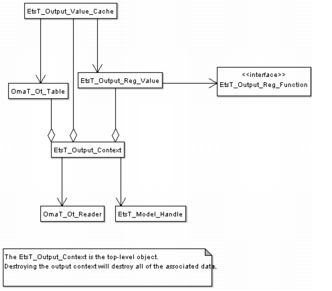
- Output Context (EtsT_Output_Context)—holds and caches the state for accessing output information for a specific output source for a specific network model
- Output Registered Value (EtsT_Output_Reg_Value)—defines a registered output value. Each registered output value is associated with a function for retrieving the value from an output table. The ETS Output package defines some common functions so it is usually not necessary for value publishers to write their own function.
- Output Value Cache (EtsT_Output_Value_Cache)—holds information about a specific registered value so that subsequent calls are more efficient. Each output context contains value caches for each registered value that has been accessed.
Figure 15: Output Context Structure
Client Code Usage
To access output value data, you must include the following line in your code.
#include "ets_api_output.h"
Before using the functions in this package, either call the analysis (Flow Analysis or discrete event simulation) or make sure that it has already been run and that the results have been saved to output tables. (It might be necessary to enable certain reporting options to generate a report with the information you want.) Then:
- Initialize the output context using Ets_Output_Context_Create().
- Access the desired output values using Ets_Output_Obj_Value_Get().
- Destroy the output context when you are done using it with Ets_Output_Context_Destroy().
Note: The output context must be destroyed and recreated if the analysis has been run more recently.
Model Developer Usage
To publish an output value, first register the output value using Ets_Output_Table_Value_Register() (or the appropriate form based on the source). A value can be registered at any time prior to accessing the value (it need not be done at program initialization or after the Flow Analysis run).
Depending on the complexity of the value, you might need to write a callback function. In many cases, you can use the ets_output_standard_obj_value_get() function. The Ets_Output_Value_Cache_ functions can be used to implement efficient custom look-up functions.
Examples
Single Scalar Value
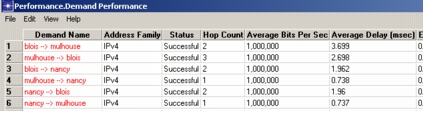
The simplest case involves obtaining a single scalar output value that corresponds to a single object. For example, an IP traffic flow has a flow rate. The raw value is stored in the time-varying Traffic (bits/second) profile attribute on the demand. When Flow Analysis is run, the value for each demand is based on the selected Flow Analysis Reports reporting interval, interval sizes, and the Flow Analysis traffic scaling factor. Any clients of Flow Analysis will generally want to use a single value based on these same settings. The best way to do this is to obtain the information from the Flow Analysis output data. This information is output in the Performance.Demand Performance report. The value of interest is in the Average Bits Per Sec column.
Figure 16: Demand Performance Report
To obtain the flow rate, follow these steps:
-
Register the output value.
To register the output value, the column tags are needed for the object column and the value column. Export the report to XML and look at the column information.
<?xml version="1.0" encoding="ISO-8859-1" ?>
- <table name="Performance.Demand Performance" file="Greenfield_Design-chordal_ring_design_ref-FLAN">
<column tag="DemandName" type="string shared" title="Demand Name" format="%s" />
<column tag="AddressFamily" type="string" title="Address Family" format="%s" />
<column tag="FailedStatus" type="string shared" title="Status" format="%s" />
<column tag="HopCount" type="string" title="Hop Count" format="%s" />
<column tag="AvgBitsPerSec" type="string" title="Average Bits Per Sec" format="%s" />
<column tag="Delay" type="string" title="Average Delay (msec)" format="%s" />
<column tag="Jitter" type="string" title="End to End Jitter (msec)" format="%s" />
<column tag="PacketLoss" type="string" title="Maximum Packet Loss (%)" format="%s" />
<column tag="Volume" type="string" title="Volume" format="%s" />
<column tag="DefinitionDetail" type="string" title="Definition Detail" format="%s" />
<column tag="RoutingDetail" type="string" title="Routing Detail" format="%s" />
Each row in this report corresponds to one IP flow. Each flow is represented by only one row. This is the simplest case (one-to-one mapping). This XML shows that the column tag for the column that identifies the object is DemandName. The column tag for the target value is AvgBitsPerSec. Note that the column identifying the object must be a HotLink column (one that is colored in Red in the Viewer). The output value is registered using the following function call:
Ets_Output_Table_Value_Register ("Demand Avg Bits Per Sec",
    EtsC_Output_Source_FLAN,
    EtsC_Obj_Type_Flow,
    "Performance.Demand Performance",
    "AvgBitsPerSec",
    "DemandName",
    ets_output_standard_obj_value_get);
The arguments are explained in the following table:
Table 169: Ets_Output_Table_Value_Register() Arguments
Argument Type Definition value_namechar *The name of the output value as it will be known to callers of Ets_Output_Obj_Value_Get(). This value will be published as Demand Avg Bits Per Sec. This value should be unique for a given source, object type tuple. result_sourceEtsT_Output_SourceThe source (analysis engine) that is generating the output. Typically, the engine is Flow Analysis (EtsC_Output_Source_FLAN). obj_typeEtsT_Obj_TypeObject type or meta-type that this output value applies. A meta-type like EtsC_Obj_Mtype_Link applies to all of the derived types like EtsC_Obj_Type_Lkdup. In this case, the object type is EtsC_Obj_Type_Flow. table_namechar *The name of the output table (OT) that contains the output value. This value is in the Performance.Demand Performance table. column_tagchar *Column tag value for the column that contains the output value of interest. This might be different than the displayed column header. The tag is available from the report .xml file. This column tag is AvgBitsPerSec. hot_link_column_tagchar *The column tag value for the column that contains the hot link object that is used to define which object the row corresponds. Usually this is the first column and it contains the object’s name. This hot-link column tag value is DemandName. value_func_ptrEtsT_Output_Reg_FunctionThe function that is dispatched to get the value. The Ets Output package supplies some predefined value functions. This example uses the simplest of these: ets_output_standard_obj_value_get(). This function outputs the raw cell value from the OT in the same format as it is displayed in the table. The .xml file defines the type of each column. Usually the column type is string even if the value displayed is a numeric value. -
Create an output context.
EtsT_Model_Handle model_hndl = Ets_Model_Current_Get (EtsC_Model_Nt); EtsT_Output_Context * c_ptr = Ets_Output_Context_Create (model_hndl, EtsC_Output_Source_FLAN); -
Get the output value for the target object.
EtsT_Obj_Handle flow_hndl; char * lsp_bw_ptr; if (Ets_Output_Obj_Value_Get (c_ptr, flow_hndl, "Demand Avg Bits Per Sec", &lsp_bw_str) != EtsC_Output_Status_SUCCESS) FRET (PrgC_Compcode_Failure); -
Convert the value to the desired format.
The output value is a string value. To use the value as a flow value in bps, it must be converted from the formatted string to a double. The memory for the string was allocated in the Ets_Output_Obj_Value_Get() function call, so it also needs to be freed when it is no longer needed.
double flow_bps; prg_string_to_double (lsp_bw_str, &flow_bps); prg_string_free (lsp_bw_str); -
Destroy the output context.
When finished accessing data from the output source, destroy the output context.
Ets_Output_Context_Destroy (c_ptr);If the output context is out-of-date (for example, Flow Analysis is rerun), destroy and recreate the output context to refresh the cache.
List Value
In some cases, the output value might correspond to a list of values displayed in the same column in multiple cells in consecutive rows. An LSP’s route is an example of this output table format.
Figure 17: LSP Routes Report
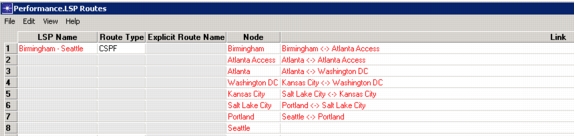
The list of objects in the Link column can be obtained in a similar way to the scalar value of the preceding example.
-
Register the output value.
The output value is registered using Ets_Output_Table_Value_Register_With_Type(). The symbolic constant
EtsC_Output_Value_Type_Hot_Link_Object_Namedirects the value to refer to the hot-linked object in the target cell instead of the cell displayed value. The value function ets_output_standard_obj_value_list_get() is used to output the value as anEtsT_Obj_List.Ets_Output_Table_Value_Register_With_Type ("LSP Route", EtsC_Output_Source_FLAN, EtsC_Obj_Type_Path, "Performance.LSP Routes", "Link", "LspName", EtsC_Output_Value_Type_Hot_Link_Object_Name, ets_output_standard_obj_value_list_get); -
Get the output value.
Creating the output context is the same as with the scalar value. Getting the output value is quite similar.
EtsT_Obj_List *route_lptr = PRGC_NIL;

// Get the ordered list of link objects in the LSP path in
// the output variable route_lptr.
if (Ets_Output_Obj_Value_Get (c_ptr, lsp_hndl, "LSP Route", route_lptr) != EtsC_Output_Status_SUCCESS)
    FRET (route_lptr);

Ets_Obj_List_Destroy (route_lptr);
Multi-Column Keys
In the preceding two examples, the key for the output value is simply one object, and there exists one entry in the output table that corresponds to that object. In some cases, multiple columns (tuples, triples, etc.) are required to identify the desired value in the table. Consider, for example, obtaining the utilization for a queue. The queue is not a first-class object. It is identified by the node, interface, and traffic class. The node is the first-class object that is used as the primary key. The interface and traffic class complete the triplet that is used as the key to the desired output value in the DiffServ-Interface Queue Usage report.
Figure 18: LSP Routes Report
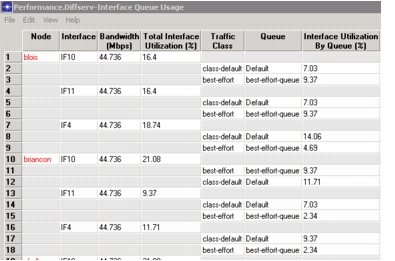
This type of output value is referred to as a multi-column value. The value is registered using Ets_Output_Table_Multi_Col_Value_Register_With_Type(). The primary object is passed as the hot_link_column_tag. The tags of the other columns are passed in a list.
-
Register the multi-column value.
multi_col_lptr = prg_list_create (); prg_list_insert (multi_col_lptr,prg_string_copy ("Interface"), PRGC_LISTPOS_TAIL); prg_list_insert (multi_col_lptr, prg_string_copy ("Traffic Class"), PRGC_LISTPOS_TAIL); Ets_Output_Table_Multi_Col_Value_Register_With_Type "Queue Interface Utilization", EtsC_Output_Source_FLAN, EtsC_Obj_Mtype_Node, "Performance.Diffserv-Interface Queue Usage", "Interface Utilization By Queue (%)", "Node", EtsC_Output_Value_Type_Cell_Value, multi_col_lptr, ets_output_standard_obj_multi_col_value_get); prg_list_destroy (multi_col_lptr, 1); -
Get the value based on a multi-column key.
The value is obtained by passing the name of the output value with the values for the qualifying columns. For example, the
output_value_nameto get the best-effort queue utilization for interface IF10 would be:Queue Interface Utilization [IF10] [best-effort]
char attr_name [1024];
char * util_str = PRGC_NIL;
double util;

sprintf (attr_name, "Queue Interface Utilization [%s] [%s]", ifc_name,
queue_name);

if (Ets_Output_Obj_Value_Get (c_ptr,
    node_hndl,
    attr_name,
    &util_str) != EtsC_Output_Status_SUCCESS)
        util = 0.0;
else
    {
    // Convert string to double
    prg_string_to_double (util_str, &util);
    prg_string_free (util_str);
    }
In most cases, a given primary object is only given once in the output table (as in the queue utilization case). All of the rows corresponding to the given primary object are given in one contiguous block. Normally, if the desired value is not found in the first block for the object, it is assumed not to be in the table. In some cases, there might be multiple rows in the table corresponding to the same primary object that are not contiguous in the table. An example is a table of link utilization when each direction of the link is given in a separate row. If the table is sorted by utilization, the two directions might not be adjacent in the table. In order to support this behavior, an option needs to be set by calling Ets_Output_Reg_Value_Multiple_Discontiguous_Rows_Support(). This is only applicable to multi-column output values.
Standard Output Values
Some output values are registered in the file util/flan_register_values.ets.c and included in flan.ets.dll. This library is loaded whenever Flow Analysis is loaded, so these values are available to all Flow Analysis clients.
Table 170: Standard Flow Analysis Output Values
| Output Value Name | Primary Object | Additional Columns | Value Type | Definition |
|---|---|---|---|---|
| Demand Avg Bits Per Sec | Flow | String (bps) | IP demand’s average bit rate for the reporting period | |
| Mean Utilization | Link | String (utilization in percent) | A link’s mean utilization value (higher of two directions) | |
| Mean Utilization | Path | String (utilization in percent) | An LSP’s mean utilization value (percentage of reserved bandwidth for the LSP) | |
| Mean Flow Bandwidth | Link | String (flow in Mbps) | Mean flow of traffic demands over a link in Mbps (higher of two directions). Does not include demands that indirectly use the link (carried over virtual circuits, etc.) or background load. | |
| Mean Flow Bandwidth | Path | String (flow in Mbps) | Mean flow of traffic demands over an LSP in Mbps | |
| Mean Consumed Bandwidth | Link | String (consumed bandwidth in Mbps) | Consumed bandwidth of link in Mbps (higher of two directions). The consumed bandwidth includes both background load and traffic demands. Includes flows that directly and indirectly use the links. | |
| Mean Consumed Bandwidth | Path | String (consumed bandwidth in Mbps) | Consumed bandwidth of link in Mbps. The consumed bandwidth includes both background load and traffic demands. | |
| Failed LSP Route Type | Path | String (route type such as CSPF, Explicit Route, Operational) | Gets the attempted route type for failed LSPs | |
| Throughput Forward | Link | String (Mbps) | The throughput on the link in the forward direction in Mbps | |
| Throughput Return | Link | String (Mbps) | The throughput on the link in the return direction in Mbps | |
| LSP Route Origin | Path | String (route origin value such as Explicit Route, CSPF, Operational) | Obtains the route origin for a successfully routed LSP | |
| LSP Route | Path | EtsT_Obj_List of links in the path | Outputs the list of links in the route of a successfully routed LSP | |
| Queue Interface Utilization | Node | [Interface Name][Traffic Class Name] | String (interface utilization by this queue) | The utilization of this interface by this queue (% of total interface bandwidth) |
| Traffic Engineering Residual Bandwidth | Node | [Interface Name][Class Type] | String (Mbps) | The amount of remaining reservable bandwidth on an interface for a given MPLS DS-TE class type. |
| Failed LSP Bottleneck Links | Path | EtsT_Obj_List of link objects | Bottleneck links in the candidate paths for an LSP that failed to route. | |
| Failed LSP Candidate Routes | Path | PrgT_List of string values | Each LSP candidate route in the list is a string containing node, link, node names, where the names are hierarchical names | |
| Interface Scheduler Bandwidth | Node | [Interface] | String (Mbps) | The total bandwidth of the scheduler for the interface in Mbps |