Ets_Shape_Round_Rect_Create()
Note: Requires OPNET Development Kit
Abstract
Creates a new rounded rectangle shape.
Syntax
Ets_Shape_Round_Rect_Create (box, radius, edge_line_width, edge_line_style, edge_line_color, fill_pattern, fill_fore_color, fill_back_color)
| Argument | Type | Description |
|---|---|---|
box |
EtsT_Shape_Rect |
Size of the rectangle. See Shape Data Types for details. |
radius |
double |
Radius for corner rounding (described in Details). |
edge_line_width |
int |
The width of the lines, in pixels. |
edge_line_style |
EtsT_Shape_Line_Style |
The style of the lines, either EtsC_Shape_Line_Solid or EtsC_Shape_Line_None (invisible). |
edge_line_color |
EtsT_Color |
The color of the lines. See Shape Colors for details. |
fill_pattern |
EtsT_Shape_Brush_Name |
Pattern for filling region (described in Details). |
fill_fore_color |
EtsT_Color |
Foreground color for fill patterns. Transparent if unspecified. See Shape Colors for details. |
fill_back_color |
EtsT_Color |
Background color for fill patterns. Transparent if unspecified. See Shape Colors for details. |
Return Type
EtsT_Shape_Handle
A handle to the new shape.
Header
ets_api_shapeset.h
Details
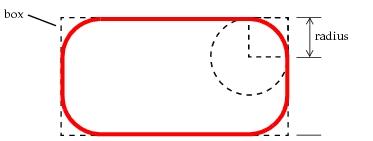
A rounded rectangle is a rectangle with rounded corners. The radius is expressed as a fraction of the length of the shorter side of the rectangle. For example, in Figure 8, the thick red line shows the rounded rectangle created by a radius that is one-third of the box’s shorter side.
Figure 8: Specifying a Round Rectangle Shape
The fill pattern can be either an icon name (in which case the shape is filled with tiled copies of the icon), EtsC_Shape_Brush_None (transparent fill), or EtsC_Shape_Brush_Solid (solid fill using the foreground color). If an icon is specified, its non-transparent areas are displayed using the foreground color and transparent areas use the background color.