Sub-Packages
Most Anim package KPs are categorized into one of the sub-packages listed in Table 5.
Table 5: Anim Package Sub-Packages
| Acronym | Name | Description |
|---|---|---|
| Igp | Immediate-Mode Graphics Primitive | graphical primitive operation directed to an animation viewer |
| Ime | Immediate-Mode Model Element | model element operation directed to an animation viewer |
| Mgp | Macro-Oriented Graphics Primitive | graphical primitive appended to an animation macro |
| Mme | Macro-Oriented Model Element | model element appended to an animation macro |
Igp sub-package KPs each issue a request for an immediate-mode graphical primitive, directed to a specific animation viewer. Most Igp KPs draw conventional graphical components, as shown below. The KPs accept viewer coordinate arguments that specify primitive position and size, and a graphical property argument that determines the appearance of the primitive (properties include foreground and background color, fill pattern, text font and alignment, and retention). If the retain property is specified, retained drawings are created for these primitives.
Figure 4: Shapes Drawn by Basic Igp KPs
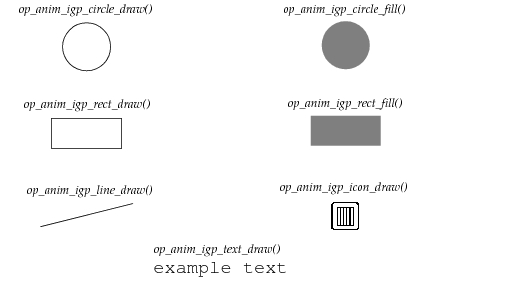
There are two other Igp KPs that produce drawings: op_anim_igp_bg_fill() fills an animation viewer with a specified color or pattern, and op_anim_igp_macro_draw() invokes a previously-defined macro with specified parameter assignments.
By their nature, animations often require moving or changing graphics primitives. Graphical updating is decomposed into two steps:
- Erase an old primitive
- Draw a new primitive at another location or with a changed property
The first step can be accomplished using the KP op_anim_igp_drawing_erase(), which erases and destroys a retained drawing. For macro drawings, both updating steps can be accomplished in a single KP, op_anim_igp_macro_redraw(), which applies new parameter assignments to the macro drawing.
The Mgp KPs append an animation request to a specified macro, which will later be invoked and execute the request. The Mgp sub-package mainly consists of macro-oriented equivalents to the Igp drawing KPs, as shown in Table 6.
Table 6: Mgp Equivalents of Igp KPs
It is possible to consider a macro a simple procedure composed of Mgp KP “statements”. Within these statements, registers serve the role of variables, providing abstraction capabilities within a macro. For instance, a single macro could draw a circle of an arbitrary size if the radius is a register value. Arithmetic operations on registers are supported by two KPs: op_anim_mgp_arop() performs an arithmetic operation involving two operand registers and a result register; i.e., addition, subtraction, multiplication, and division. The KP op_anim_mgp_reg_set() assigns a constant value to a register.
A macro can be divided into two sections: setup and graphics. The setup section is typically restricted to the calculation of coordinate values. The graphics section typically performs the draw operations. When a process model invokes a macro, both the setup and graphics sections are executed. The reason for the definition of two macro sections is to separate out the setup operations that only need to be performed once, thus increasing the performance of macro reinvocation. When a macro is initially invoked by op_anim_igp_macro_draw(), both the setup and graphics sections are normally executed. However, when a macro is reinvoked by op_anim_igp_macro_redraw(), only the graphics section is normally executed to perform an erase and redraw. Similarly, when a viewer's entire contents are redrawn, only the graphics sections of macros are executed. Special option flags can be specified to modify this behavior: the property flag OPC_ANIM_SETUP limits an initial macro invocation to just the setup section (and also suspends execution due to subsequent viewer redraws until a an explicit redraw occurs), and the mode flag OPC_ANIM_ERASE_MODE_XOR_RESET causes the setup section to be executed during a macro reinvocation. The KP op_anim_mgp_setup_end() defines the end of the setup section, and implies the subsequent beginning of the graphics section. If the KP op_anim_mgp_setup_end() does not appear in the macro definition, the macro only has the graphics section.
Macros are manipulated by KPs that are not part of the Mgp sub-package. KPs exist for creating a new macro (op_anim_macro_create()) and destroying a macro that is no longer needed (op_anim_macro_destroy()). A macro is created with open status, thus accepting any number of Mgp KP references that append requests to the macro. When a macro definition is complete, it can be changed to closed status via the KP op_anim_macro_close(). Closing a macro prevents new requests from being added and provides simple coordination between multiple processes that share the macro.
Beyond the basic graphical primitive KPs discussed so far, the Ime sub-package provides higher-level operations that are applied to model diagrams displayed within animation viewers. Before any other Ime KPs can be applied to a viewer, an animation must have loaded and displayed a model diagram in the viewer via the KP op_anim_ime_nmod_draw(). this KP supports network, node, and process models. Note the nmod term: it is a contraction for “named model”, referring to the fact that the target module is identified by its name attribute. Other similar terms used in the Ime package are nobj (“named object”) and npath (“named path”).
After a model diagram has been displayed, graphical attributes of model elements may be modified via the KP op_anim_ime_nobj_update(). Graphical attributes include position (mobile nodes), color (path elements), and icon (nodes, modules, and states). Dynamic objects such as packets and interrupts are not depicted in model diagrams within the editors because they are not part of the model structure. However, they can appear in animations and the KP op_anim_ime_npath_traverse() can be used to depict the traversal of packets on streams and interrupts on statistic wires.
Animation of mobile nodes or other moving objects within a network model diagram is an important visualization technique for radio-based scenarios. For viewers displaying network model diagrams, the KP op_anim_ime_gen_pos() converts position data from subnet coordinates to viewer coordinates. The KP also provides this service for other model types; however, these model diagrams have simple conversion ratios such as 1:1 or 2:1. A process model can use this KP to determine a mobile or satellite node’s dynamic position and draw graphical primitives at that location. Similarly, this KP can be used to determine the position of objects such as regional boundaries or fixed nodes, which have static locations.
Drawing graphical primitives in the proximity of model elements requires that the positions of these elements be determined. The animation KP that determines model element positions (op_anim_mme_nobj_pos()) operates only within the context of a macro and loads the position data into registers.
Several Anim package KPs deal exclusively with viewer issues. An animation viewer ID must be obtained before any Igp or Ime KPs can be applied to it. There are several techniques to obtain a viewer ID, one of which is to directly open a viewer. Process models can open viewers using the KPs op_anim_viewer_open(), for viewers with arbitrary positions and sizes, or op_anim_viewer_open_std(), for viewers with standard positions and sizes that track the growth of the op_vuanim workspace. If these KPs are passed the name of a viewer that has already been opened, no new viewer will be opened, and the existing viewer’s ID will be returned. This mechanism is known as a rendezvous.
Viewer IDs can also be obtained for viewers associated with custom animation probes. The symbolic constant OPC_ANIM_ANVID_PBSPEC serves as a substitute viewer ID, indicating that the actual viewer ID should be obtained from any active custom animation probe. An animation viewer can be obtained from a specific labeled custom animation probe using the KP op_anim_lprobe_anvid(), which also supports rendezvous capability. If a probe with the specified label does not exist, a null viewer ID is returned and KPs that reference the viewer ID are not executed.
Occasionally, it is useful in an animation flow to force a redraw of a viewer in order to get the viewer’s displayed contents back to a known state (all non-retained graphical primitives or glitches are erased, and only retained objects reappear). This can be done via the KP op_anim_viewer_redraw(). When a viewer is no longer needed, it can be removed and deallocated via the KP op_anim_viewer_close().
There are several KPs that deal with animation flow control. The KP op_anim_force() issues a request that, when executed by op_vuanim, will force any graphics operations buffered by the window system to be displayed. Graphics force requests are automatically performed by Ime sub-package KPs and macro invocations, but groups of Igp graphical primitives that should appear together may require a trailing force request, depending on the configuration of the window system. An animation flow can be stopped by the KP op_anim_flow_end(); later invocations of Anim package KPs will be ignored by the Simulation Kernel.